Apple has officially rolled out iOS 18.2, and with it come some major updates to the native Mail app. As both an email strategist and…


Ah, the spam filter: an email marketer’s nemesis. Finding our way through that filter and into the inbox keeps us email marketers on our toes—and…
When you sign on to the emfluence Marketing Platform, you not only get the fantastic resources who work in the Kansas City office, but you…
You’ve perfected the spacing, the images are just the right size, and now you’re ready to test and run pre-flight (which we always suggest before…
In a world where email marketers know the value of each email and, therefore, want to send as much email as possible, it seems unlikely….
The blogosphere may be buzzing about mobile-responsive email templates and video in email, but the bottom line is – if you want to optimize your email design to boost your open and click rates, you’ve got to know where and how your own audience looks at your emails.
Gmail has rolled out their new Inbox, featuring a tabbed (categorized) look. There are three default tabs for “Primary,” social notifications and promotions. Many email marketers’ emails will probably be classified as promotions, and so many are concerned that it will decrease open and click through rates.
A few months ago, an email marketing client called who had been collecting email addresses for over 8 years, and they’d never sent out an email. They ask what they needed to do to start sending, since some of those addresses would be pretty old and I answered: time for a Re-Permission Campaign. First, we had to talk about why we needed to ask permission again…
When email marketers go from an email platform that doesn’t utilize authentication tactics like Domain Keys and SPF records to one that does — like emfluence — it’s not uncommon to be confused. Why do we have to take these steps?
What does it mean when your email goes “missing”? How is that different from a bounce? How should email marketers identify and address them differently?
It’s a sensitive topic… No one wants to admit that they’re old. But, when you have a list… *ahem* of a certain age, you do have to work a little harder to take good care of it.
Let’s say you’ve been collecting names for a long time, but haven’t sent to them yet (this is a bad idea, more on this later) or you have a ton of hand written names that you’ve had typed up and are ready to import into your email database. Before you upload, you should take a couple precautions to ensure that bad addresses don’t wreck your sender reputation and make you look like a Spammer.
Your email deliverability – whether or not you’re being delivered to your subscribers’ inboxes – is a huge factor in what return on investment you earn from your email campaigns. After all, if the subscriber doesn’t see your email, they can’t act on it.
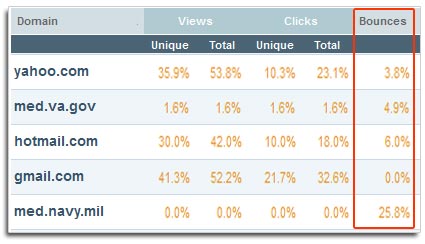
Domain Level ReportingOne of the benefits of email marketing is that, like all digital marketing, it comes equipped with analytics and reporting that can talk to you about the status of your campaigns. One of the most important set of metrics to watch is your results by domain. Domain-level reporting allows you to see results not just of your email as a whole, but also across each receiving domain.
Whether you attended or if you didn’t get the chance, the notes will be worth gold. Take a peek at the top takeaways from the three keynote presentations at the 2011 emfluence Marketing Platform User Conference.
A scary fact: in 2010, only 33% of email users have images turned on by default in their email client, down even further from the 2006 number of just over 50% (Source: Marketing Sherpa, 2010). Yikes! When you’re designing beautiful emails, does your email still fly without images turned on? Check these 5 ways that you should design without images in mind.
Last week, I got a great question from one of our savviest email marketing clients: “How are you advising your clients to prepare for the changes with Hotmail? Should we be versioning or quarantining our Hotmail lists and watching them more closely?”
At the emfluence User Conference last month, our CEO and Head Email Brainiac, Dave Cacioppo, gave a rockin’ keynote: “Email ROI: Let It Rock!” Our users voted it the best takeaway content of the day, so we thought we’d share the good info. So, Dave, how do you rock your email ROI?
Research says that up to 30% of your email list could turn over every year. With no official National Change of Email Address list, in a worst case scenario, you could lose over 80% of your email addresses in 5 years unless you take action to maintain your list. These email addresses represent valid prospects that originally told you they wanted your mail and reconnecting with them is still a lower cost than new customer acquisition.
Getting in to the inbox comes down to two key concepts: Content and Reputation. In this issue of emsights, we’ll focus on Content. We’ll discuss how you can “Pre-Flight” your message to determine whether or not it’s likely to pass common Spam filters and show you how you can verify that your HTML code will render properly across a broad range of email clients.
Slight changes in copy and/or images can make a world of difference in the rendering and deliverability of your email campaign. It seems like a…
Ok, as part of your Pre-Flight routine you’ve previewed your email in the 7 most important email clients. Now it’s time to see if they’re getting past the guard dogs, aka SPAM filters. Good code and good design are important, but not if nobody sees your campaign.
As an email marketer, you have plenty of challenges when it comes to getting your messages out the door and into the inbox. And getting in doesn’t mean the end of those challenges. A good Pre-Flight or Campaign Preview tool will allow you to view your message in some or all of these email clients before sending so you can fix or rearrange any issues before you deploy.